Coconuts are cheap in Ukenzagapia, so it was a favorite high-calorie field snack. I'd crack them open and then use a butter knife to chip out pieces of coconut. I love coconut, but I don't ever buy them whole here in Big City. It just feels... out of place.
Today I went to an event to be recognized for a modest award. I didn't know anyone else at the event but I hung around afterwards for the food. I had a small lunch, and I'm a real sucker for cheese and crackers. They had a nice spread of fruit, too, and there in the center of the fruit plate was a big chunk of coconut in the shell as garnish. I really, really wanted to eat it.
I decided that eating the garnish would be kind of weird (and awkward without a knife), so I stood around eating my heaping plate of goodies, hoping no one else would take the coconut so I could pick it up on my way out. Through little effort of my own, I started talking to two other awardees before I could finish my food and split. One thing led to another, and I ended up in conversation with a computer science graduate student. Just yesterday I hit a wall (right at the beginning) trying to figure out how to use a Perl script to manage metadata (translation: simple computer science problem). This student is working on a very similar method in Python, and will almost surely be able to help me. All because I wanted some coconut.
There have been many times in grad school when good things have come from "just showing up", but in this case it took some bait to make me stick around.

Showing posts with label computers. Show all posts
Showing posts with label computers. Show all posts
Thursday, April 19, 2012


Monday, September 19, 2011
Geotagging photos and saving tracks on a Garmin GPS
Surely someone else will find this information useful. I use a Garmin GPSmap 60Cx. For the past 3 trips to the field I have been religiously saving my GPS track at the end of the day so I have a record of where I went. I save it with the date, then I clear the track so I can start fresh the next day. At least every few days, I download all of my waypoints and tracks to Garmin's BaseCamp program to make sure I have a backup of all of the points and tracks.
I've known that geotagging my photos using a tracklog from my GPS was possible, but I didn't try it until this trip. There are some simple programs (such as PhotoGPSEditor) that match up the time on your track with the timestamp on your photo, and voila! Your photo is geotagged.
However, this means YOUR TRACKS HAVE TO HAVE TIMESTAMPS. When you "save" your track on the GPS, IT STRIPS THE TIMESTAMPS*. This means that if you want to use your Garmin (GPSmap 60Cx or similar) to geotag your photos, you need to download the ACTIVE track every day.
I could have geotagged thousands of photos this way if only I'd known. Learn from my mistake. Download your active log before clearing it! Don't just rely on that "save" function!
*Apparently this is a space-saving measure- a stupid one in my opinion. You should at least have the option to preserve timestamps or not.
Wednesday, August 31, 2011
My new data backup plan
A few weeks ago I wrote about how I realized that backups using Apple's Time Machine really isn't the best way for me to backup my laptop. I've got a new plan. I have 3 external hard drives, and here's how I use each.
1 tb drive: This one lives in my office at UBC. I partitioned it so there are 3 separate "drives". One partition is for incremental Time Machine backups. Another partition is for a bootable clone of my hard drive using Carbon Copy Cloner. This means that if my hard drive fails, I could use someone else's laptop to boot from my clone (you can't do this with a Time Machine backup). I think I have it set so that it doesn't archive changes (like Time Machine does) so the clone should be exactly the same size as my hard drive when it's cloned. The third partition is for files that I don't need on my computer anymore but don't want to delete permanently (some photos and music).
500 gb drive: This drive lives at the museum. It has two partitions: one for incremental Time Machine backups, and one for those files.
320 gb drive: This one is with me in Ukenzagapia and is the same size as my MacBook hard drive. Previously, I used Time Machine to back up to it, but I'd really be SOL in Ukenzagapia if I had to buy a new MacBook to get at the files! Now I'm using Carbon Copy Cloner to make a bootable clone of my drive without archiving.
Additionally, I have an 8 gb flash drive that I will put all of my most important documents on as a final backup. I should back up to the flash drive and my Ukenzagapia drive every Sunday at the very least.
A friend of mine recently had an external hard drive with years of photos fail on her, so I want to be sure that any files I have only on an external drive are on more than one external drive.
What do you think? Suggestions for improvement?
Tuesday, August 16, 2011
Backups
I wrote a couple of years ago about my backup plan, but it's time to revisit it in light of new information.
While I was at the conference, I brought my MacBook to the local Apple Store to get a minor problem fixed*. My AppleCare extended warranty will expire while I'm in Ukenzagapia, so I wanted to be sure to get it taken care of before I left. They had to replace my whole display, which I figured would be the case. What I didn't expect was that they said it's a 4-5 hour task so I needed to leave my computer for up to 3 days! Still, I was ok with this because I had brought my external hard drive anticipating this separation from my computer. I use Time Machine to back up to 2 different external hard drives. I thought I'd be able to boot from my TM backup onto my friend's MacBook, but no. Time Machine backups are serial locked to the original computer. The only way to get your data off a Time Machine backup (according to the guy at the store) is a full restore onto a different machine (erasing whatever might have been on there).
So, I need a new backup plan. I will keep doing Time Machine backups, but I think I need to do something else too that would allow me to access important files via another computer. What do you do? Should I partition my back up drive and keep part of it for TM backups, and part of it for "manual" backup copies of the stuff I'd need to access from another computer in case mine fails?
Online backup options are out of the question right now because I can't do them in Ukenzagpia. I have some (mostly shared) files in Dropbox but I only have 2 gb. In Ukenzagapia I plan to back up to a third external hard drive.
*The Apple logo on my display became unglued. While this is mostly cosmetic, it does let dust in behind the screen, and I think it increases the risk of my screen getting damaged from behind. I really didn't want to end up with a shattered screen in Ukenzagapia!
Wednesday, December 15, 2010
Tranformations!
For years now I have thought that there should be an easy way to capitalize or de-capitalize selected text. I always imagined it would be a key on the keyboard, but I just discovered that it exists in the magic world of right-click!
If I'm composing or editing text and I right-click, one of the options is "transformations" then the options are "Make upper case", "Make lower case" or "Capitalize". This is SO useful for editing the title of journal articles so that each letter isn't capitalized (this is often the case when I download the citation, but most bibliography styles require lower case).
For how long have I been tediously changing one letter or word at a time? Is this a Mac-only thing, or can my non-Macophile readers do this too?
If I'm composing or editing text and I right-click, one of the options is "transformations" then the options are "Make upper case", "Make lower case" or "Capitalize". This is SO useful for editing the title of journal articles so that each letter isn't capitalized (this is often the case when I download the citation, but most bibliography styles require lower case).
For how long have I been tediously changing one letter or word at a time? Is this a Mac-only thing, or can my non-Macophile readers do this too?
Monday, September 6, 2010
Tools for a scientist: September Scientiae
Anthropologists can study civilizations by examining their tools. This month, we can learn a lot about what some science bloggers do by hearing about the tools that they use in their daily science lives. You might pick up a useful suggestion or two along the way, be it software, pens, or notebooks!
rocketscientista calls this the most wonderful time of the year. I knew there'd be at least one person who wanted to effuse their love of office supplies! She tells us about her quest- and success- in search of the best lab notebook ever. I'm sure others will want to find out what it is. Also, she gets to play with liquid nitrogen. Awesome. But perhaps best of all, rocketscientista uses owl pellets. How? You'll have to read her post and find out.
Rocksinspace has a great list of supplies that keep her organized including multiple colors of pens and special notebooks. She also has 3 terabytes of external hard drives and is going to need a 4th soon- she works with enormous data files! On her blog she also shares a revelation about the disorganization of pdfs on her computer and is now getting reorganized with Mendeley.
FrauTech literally has a toolbox. She's got some timeless classics (drafting pencils and calipers) as well as the more sophisticated tools of today (matlab and a 3D modeling program), some basics that few of us can do without (coffee and Excel), and some things that are unquestionably tools by anyone's definition (screwdrivers, wrenches, a hammer, and more). Can you guess her field of work?
ecogeofemme doesn't obsess over school supplies but associates this time of year with new clothes. She also finds that the new lab she has joined as a postdoc is missing some of the things that belong in a lab based on her previous experiences.
Jaxwolf does a lot of her science in the field and has to be ready for anything with the ten essentials. She'd rather not head to the field without a GPS, compass, maps, first aid kit, multitool, waterproof notebooks, and duct tape. That stuff is amazing.
sarcozona gets the prize for most unique tool: the cone guillotine. What in the world is a cone guillotine for? You'll have to go check it out, complete with a photo.
microbiologist xx needs some sterile wooden sticks and a whole lot more for her research. She tells us why the microscope is her favorite tool, and includes some awesome photos to illustrate her point!
Melissa from Confused at a higher level shares some outstanding advice for anyone starting up a lab (especially at a primarily undergraduate institution). She has great suggestions for how to make the most out of start-up funds by thinking long-term. In the same post she shares an A-to-X list of things she uses in an experimental condensed matter physics lab. I love it!
NJS (Scientist Rising) reminds us that a lot of science doesn't happen in a lab (or in the field). Her work relies on her "laptop, research group computers, the department computing clusters, and a supercomputer or two." One advantage of computer-based work is that it's easily portable and she shares some tricks for managing connections with the other computers. Without those tools, she might have "killed at least one computer."
Like NJS, Alyssa's (aka Mrs. Comet Hunter) research relies heavily on computers and the internet. She wonders if she's missing out or isn't a "real scientist" because she doesn't work in a lab or do field work. As host of this month's theme, I say nay! Computers and the internet are most definitely "real science" tools, and both field and lab work have their drawbacks. If you have thoughts on the matter, you can join the discussion on Alyssa's post.
Two different bloggers wrote about their love for R (a free statistical package) and LaTeX (a free typesetting program). mariawolters calls R "the one tool I couldn't live without." As an academic who has frequently changed institutions, she is liberated from the software subscription ties of any particular university to various other [expensive] statistical packages. Eugenie also tells us how she uses Mendeley (another free program used for managing and annotating references) and BiBteX to make bibliographies in LaTeX. So much free software!
fridayafternoonwriter has learned which tools are most important to her while writing up her thesis: good software (no one else mentioned many of these programs), good hardware (wide screen monitor!), good music, and good tea. Her post reminds me that the small things that create our optimal work environment are important, too.
I have absolutely loved reading all of the different posts for this month's carnival. Thank you to everyone who contributed! I've learned about many tools that I didn't even know existed. I hope that everyone enjoys these glimpses into different fields of science!
rocketscientista calls this the most wonderful time of the year. I knew there'd be at least one person who wanted to effuse their love of office supplies! She tells us about her quest- and success- in search of the best lab notebook ever. I'm sure others will want to find out what it is. Also, she gets to play with liquid nitrogen. Awesome. But perhaps best of all, rocketscientista uses owl pellets. How? You'll have to read her post and find out.
Rocksinspace has a great list of supplies that keep her organized including multiple colors of pens and special notebooks. She also has 3 terabytes of external hard drives and is going to need a 4th soon- she works with enormous data files! On her blog she also shares a revelation about the disorganization of pdfs on her computer and is now getting reorganized with Mendeley.
FrauTech literally has a toolbox. She's got some timeless classics (drafting pencils and calipers) as well as the more sophisticated tools of today (matlab and a 3D modeling program), some basics that few of us can do without (coffee and Excel), and some things that are unquestionably tools by anyone's definition (screwdrivers, wrenches, a hammer, and more). Can you guess her field of work?
ecogeofemme doesn't obsess over school supplies but associates this time of year with new clothes. She also finds that the new lab she has joined as a postdoc is missing some of the things that belong in a lab based on her previous experiences.
Jaxwolf does a lot of her science in the field and has to be ready for anything with the ten essentials. She'd rather not head to the field without a GPS, compass, maps, first aid kit, multitool, waterproof notebooks, and duct tape. That stuff is amazing.
sarcozona gets the prize for most unique tool: the cone guillotine. What in the world is a cone guillotine for? You'll have to go check it out, complete with a photo.
microbiologist xx needs some sterile wooden sticks and a whole lot more for her research. She tells us why the microscope is her favorite tool, and includes some awesome photos to illustrate her point!
Melissa from Confused at a higher level shares some outstanding advice for anyone starting up a lab (especially at a primarily undergraduate institution). She has great suggestions for how to make the most out of start-up funds by thinking long-term. In the same post she shares an A-to-X list of things she uses in an experimental condensed matter physics lab. I love it!
NJS (Scientist Rising) reminds us that a lot of science doesn't happen in a lab (or in the field). Her work relies on her "laptop, research group computers, the department computing clusters, and a supercomputer or two." One advantage of computer-based work is that it's easily portable and she shares some tricks for managing connections with the other computers. Without those tools, she might have "killed at least one computer."
Like NJS, Alyssa's (aka Mrs. Comet Hunter) research relies heavily on computers and the internet. She wonders if she's missing out or isn't a "real scientist" because she doesn't work in a lab or do field work. As host of this month's theme, I say nay! Computers and the internet are most definitely "real science" tools, and both field and lab work have their drawbacks. If you have thoughts on the matter, you can join the discussion on Alyssa's post.
Two different bloggers wrote about their love for R (a free statistical package) and LaTeX (a free typesetting program). mariawolters calls R "the one tool I couldn't live without." As an academic who has frequently changed institutions, she is liberated from the software subscription ties of any particular university to various other [expensive] statistical packages. Eugenie also tells us how she uses Mendeley (another free program used for managing and annotating references) and BiBteX to make bibliographies in LaTeX. So much free software!
fridayafternoonwriter has learned which tools are most important to her while writing up her thesis: good software (no one else mentioned many of these programs), good hardware (wide screen monitor!), good music, and good tea. Her post reminds me that the small things that create our optimal work environment are important, too.
I have absolutely loved reading all of the different posts for this month's carnival. Thank you to everyone who contributed! I've learned about many tools that I didn't even know existed. I hope that everyone enjoys these glimpses into different fields of science!
Monday, June 7, 2010
Methods of data organization
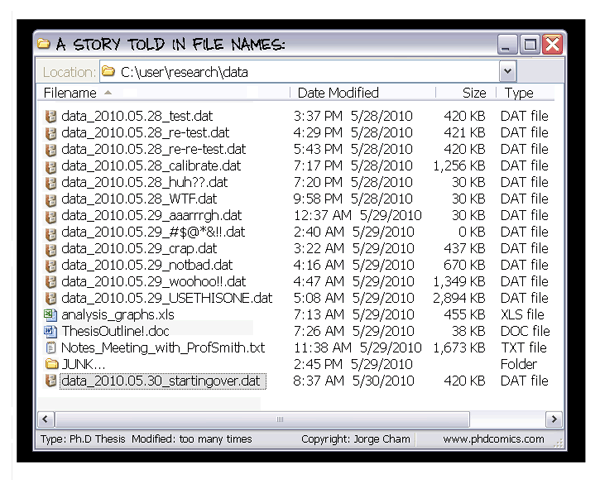
This summer I've got a lot of data to analyze. Do any of my readers have suggestions for how to organize your files and analyses so that you can keep track of what has been done? It's far too easy to modify a bunch of data, do some analyses, then come back a week later and not remember what was done or why. How do you do it, o experienced readers?
When I took a GIS class, they taught us an organization system where you always always always make a folder for your original data within your project folder and then never touch it. Then you have another folder for the stuff you're modifying. Most importantly, you keep a text file where you explain step by step everything that you are doing. This system seems like a pretty good starting point, but I'm looking for other suggestions. Mostly I just don't want to end up with something like this:
 Thank you, Ph.D. Comics, for being so topical.
When I took a GIS class, they taught us an organization system where you always always always make a folder for your original data within your project folder and then never touch it. Then you have another folder for the stuff you're modifying. Most importantly, you keep a text file where you explain step by step everything that you are doing. This system seems like a pretty good starting point, but I'm looking for other suggestions. Mostly I just don't want to end up with something like this:
Wednesday, January 13, 2010
Keeping online lives separate
Warning: This post might be boring for you if you don't use either an aggregator/feed reader or a Mac, but I've included some links and a little more explanation for those of you who otherwise wouldn't understand what in the world I'm talking about.
I am in need of some advice and new ideas for keeping my blog identity from interfering with my real one. For a long time now the number of blogs I read and comment on as my pseudonymous self greatly outnumbered those commented on by my real life persona, but these days a growing number of friends and family have blogs. I need to separate my selves.
Who else has to deal with this problem and how do you deal with it? Or maybe you just have two different gmail accounts that you use for different things? Essentially, what I need is a system for separating feeds from blogs that I comment on using two different gmail accounts.
I used to read blogs from the feed reader in Safari, but Safari started crapping out all the time. I switched to NetNewsWire, but for some reason it likes to communicate with Safari (which I still use for my realname Google calendar) and is always switching up the account I'm logged into.
I would also like to start using citation alerts via RSS (web feed) instead of email. Do you use this? Do you use the same application as you use for blogs?
Maybe I will switch to an in-browser feed reader like Google Reader and use different browsers for different accounts. My default is to always use FireFox for my pseudonymous self because Safari and Opera don't get along so well with Blogger in my experience.
On second thought, I probably don't want to use a web application (in the browser) for feeds because when I'm in Ukenzagapia I'll want to read them offline. I download my mail instead of using webmail for the same reason (I can't tell you how useful it is for me to be able to read and compose emails offline). I suppose I could try the feed reader in Mail (demo video link)- do any of my readers use this? If I use Mail I'm afraid I'll always be distracted by blogs because the unread ones show up like unread emails- bad for productivity.
Please help! What's your system?
I am in need of some advice and new ideas for keeping my blog identity from interfering with my real one. For a long time now the number of blogs I read and comment on as my pseudonymous self greatly outnumbered those commented on by my real life persona, but these days a growing number of friends and family have blogs. I need to separate my selves.
Who else has to deal with this problem and how do you deal with it? Or maybe you just have two different gmail accounts that you use for different things? Essentially, what I need is a system for separating feeds from blogs that I comment on using two different gmail accounts.
I used to read blogs from the feed reader in Safari, but Safari started crapping out all the time. I switched to NetNewsWire, but for some reason it likes to communicate with Safari (which I still use for my realname Google calendar) and is always switching up the account I'm logged into.
I would also like to start using citation alerts via RSS (web feed) instead of email. Do you use this? Do you use the same application as you use for blogs?
Maybe I will switch to an in-browser feed reader like Google Reader and use different browsers for different accounts. My default is to always use FireFox for my pseudonymous self because Safari and Opera don't get along so well with Blogger in my experience.
On second thought, I probably don't want to use a web application (in the browser) for feeds because when I'm in Ukenzagapia I'll want to read them offline. I download my mail instead of using webmail for the same reason (I can't tell you how useful it is for me to be able to read and compose emails offline). I suppose I could try the feed reader in Mail (demo video link)- do any of my readers use this? If I use Mail I'm afraid I'll always be distracted by blogs because the unread ones show up like unread emails- bad for productivity.
Please help! What's your system?
Tuesday, January 12, 2010
Maybe I should've been a librarian
I've noticed this academic year that I really enjoy connecting people with the tools, tips, and tricks to help them do research, writing, and collaboration more efficiently. I love telling people about Papers and Mendeley, both programs for managing pdfs and notes associated with journal articles. I love explaining why everyone should use a reference manager like Zotero or EndNote (or others) to cite-while-you-write and make bibliographies. I love showing people how to use wikis to facilitate group writing projects. I love sitting around and trading Mac tips and program suggestions. I love helping other grad students design their own web pages. It strikes me that these are the types of things academic librarians do these days (or at least they should).
As a result of my undergraduate experience, I greatly appreciate well-run libraries and the librarians that make them work. I received library education in several different classes, where students learned how to use the different resources available to them such as web design programs and scholarly databases. I recall that the SFC library is well-respected (albeit small, since the school is too), but I didn't appreciate what a good library was until I graduated. After graduation, Jon and I lived in a town with a public library that must have had one of the worst online catalogs in the country. Seriously, I have no idea how it could be so bad. But I digress...
I have been tossing around thoughts on some of the queries I made for myself back in November. So far the only blogworthy thing that has come out of it is my enjoyment of connecting people with research tools. I don't really know what to make of that in terms of my career choices now, but maybe I should have considered being a librarian.
As a result of my undergraduate experience, I greatly appreciate well-run libraries and the librarians that make them work. I received library education in several different classes, where students learned how to use the different resources available to them such as web design programs and scholarly databases. I recall that the SFC library is well-respected (albeit small, since the school is too), but I didn't appreciate what a good library was until I graduated. After graduation, Jon and I lived in a town with a public library that must have had one of the worst online catalogs in the country. Seriously, I have no idea how it could be so bad. But I digress...
I have been tossing around thoughts on some of the queries I made for myself back in November. So far the only blogworthy thing that has come out of it is my enjoyment of connecting people with research tools. I don't really know what to make of that in terms of my career choices now, but maybe I should have considered being a librarian.
Saturday, October 31, 2009
Angry Word
The other day I was working with a Word document that was chock-a-block full of scientific names. Suddenly I got the following message:

Has anyone else ever gotten this message? Now it doesn't put squiggly lines under the names anymore. I'm ok with that.

Has anyone else ever gotten this message? Now it doesn't put squiggly lines under the names anymore. I'm ok with that.
Tuesday, September 1, 2009
Spambots and ECOLOG
I think I know why I get so much spam.
I'm one of several thousand subscribers to ECOLOG-L, the listserv for the Ecological Society of America. When I Google myreal name, posts that I have made to ECOLOG come up in the hits, along with my email address in full. I have been very careful to prevent the listing of my email address on the internet on other sites, but didn't realize that posting to ECOLOG would open my address to spambots in the public archives.
Gmail does do an excellent job of filtering my spam, but it occasionally lets some through and sometimes I have to dig through hundreds of messages to check for a couple of messages that aren't spam. If you're thinking about posting to ECOLOG or anything else that archives publically, consider using a different email address. I wonder if they can change the archives.
I'm one of several thousand subscribers to ECOLOG-L, the listserv for the Ecological Society of America. When I Google myreal name, posts that I have made to ECOLOG come up in the hits, along with my email address in full. I have been very careful to prevent the listing of my email address on the internet on other sites, but didn't realize that posting to ECOLOG would open my address to spambots in the public archives.
Gmail does do an excellent job of filtering my spam, but it occasionally lets some through and sometimes I have to dig through hundreds of messages to check for a couple of messages that aren't spam. If you're thinking about posting to ECOLOG or anything else that archives publically, consider using a different email address. I wonder if they can change the archives.
Wednesday, July 8, 2009
Copious cables

I have a ridiculous number of adapters and cables with me. Here's a photo of (almost) all of the adapters, cables, and USB cords that I have here.
Top row: USB cables and other misc cables
Middle row: universal power strip
Bottom row: Adapters for powering and/or charging batteries for a variety of electronics, including my computer.
Monday, May 18, 2009
Internet strategies
I'm quite proud of what I got accomplished today. First thing after breakfast I went to get my permits and I was back at the hostel by 10 am! Long time readers may recall that I did not get permits when I was here last year. Thankfully I did not run into any complications- yet- this year.
It is great to have my permit. However, there are still three or four more bureaucratic steps (hoops?) that I must go through before I can actually go to my field site and begin research. Today I made significant progress on two of those steps, which involved photographs, printing, photocopying, and faxing. Tomorrow morning I hope to have a better idea of when I'll be able to head for Nyota (my field site).
Last year I made a fast friend, Helen, at the hostel. She and I would go sit in the lobby of a swanky hotel and nurse very expensive sodas in exchange for their free wireless. Well, I guess they decided they had too many backpackers in the lobby bringing down the class average, or too many of us were cheapskates. Either way, they now charge $20 per day. I found a different hotel I can't afford to stay at that only charges $10 per day, so that where I am now trying to make the most of my 24 hours.
Yesterday I wrote several emails (including a few blog posts) and sent them all when I got online today. It's really satisfying to do that.
Soon I need to figure out how to get online with the 3G USB modem I bought. I'll use it to check email when I'm at my field site, but the prices can be quite high so I need to be careful of my usage. Typical plans are in the range of 10 MB to 1 GB per month (uploads and downloads combined). Per MB charges range from about 2 cents to 30 cents, depending on the plan. In preparation for my switch to volume-based internet useage, I downloaded SurplusMeter. Clearly from my usage so far, things like large email attachments and podcast downloads will be out of the question on the USB modem. I'm stocking up on podcasts right now at the hotel while I have this fast and already paid-for internet connection.
That reminds me that I should be searching for literature right now because pdfs start to add up in the MBs as well. Better stop blogging and start working.
It is great to have my permit. However, there are still three or four more bureaucratic steps (hoops?) that I must go through before I can actually go to my field site and begin research. Today I made significant progress on two of those steps, which involved photographs, printing, photocopying, and faxing. Tomorrow morning I hope to have a better idea of when I'll be able to head for Nyota (my field site).
Last year I made a fast friend, Helen, at the hostel. She and I would go sit in the lobby of a swanky hotel and nurse very expensive sodas in exchange for their free wireless. Well, I guess they decided they had too many backpackers in the lobby bringing down the class average, or too many of us were cheapskates. Either way, they now charge $20 per day. I found a different hotel I can't afford to stay at that only charges $10 per day, so that where I am now trying to make the most of my 24 hours.
Yesterday I wrote several emails (including a few blog posts) and sent them all when I got online today. It's really satisfying to do that.
Soon I need to figure out how to get online with the 3G USB modem I bought. I'll use it to check email when I'm at my field site, but the prices can be quite high so I need to be careful of my usage. Typical plans are in the range of 10 MB to 1 GB per month (uploads and downloads combined). Per MB charges range from about 2 cents to 30 cents, depending on the plan. In preparation for my switch to volume-based internet useage, I downloaded SurplusMeter. Clearly from my usage so far, things like large email attachments and podcast downloads will be out of the question on the USB modem. I'm stocking up on podcasts right now at the hotel while I have this fast and already paid-for internet connection.
That reminds me that I should be searching for literature right now because pdfs start to add up in the MBs as well. Better stop blogging and start working.
Monday, May 11, 2009
backup plan
I thought I'd share my plan for backing up my computer and important data. This is really critical since I'll be traveling and collecting my first real data this summer.
Right after I started grad school I wrote a post with the same title. My backup plan has become more sophisticated since then. I still have my 1 GB flash drive.
My computer is a 320 GB aluminum MacBook. A few months ago I purchased a 320 GB iomega eGo external USB hard drive. This hard drive has stayed exclusively at school (less likely to burn down). I'll bring this hard drive with me so that I can continue to back up my computer competely while I'm in Ukenzagapia. I need serious backup capabilities because I'll be working with some memory-intensive data.
While in Ukenzagapia, I'll back up my computer each night and store the portable hard drive in a separate place from my computer. Ideally both of these places will be protected by lock and key. When I carry my computer with me to an internet cafe, I will not bring my external drive in case I am robbed.
Just in case a thief strikes and takes everything, I will frequently back up the very most important data on an 8 GB flash drive and carry it with me when I am away from my computer (e.g. when I'm in the field). I'll also bring my 1 GB flash drive for the same purpose.
Jon is coming to visit for a month in the middle. When he leaves, I may send back data all of the data collected so far in multiple formats (CDs, on his computer).
I also purchased a 500 GB desktop hard drive to keep at school since I'm bringing the other to Ukenzagapia. My entire computer will be backed up to this drive before I leave.
Jon purchased an identical hard drive that he will keep at home to back up his computer. I'll back up my computer to that drive as well before I leave.
This way, my data will be able to survive:
-a fire at my office
-a fire at my apartment
-theft or destruction of my computer
-theft or destruction of my portable hard drive
-theft or destruction of my flash drive
...as long as not all of them happen. I think it's a pretty good plan.
Right after I started grad school I wrote a post with the same title. My backup plan has become more sophisticated since then. I still have my 1 GB flash drive.
My computer is a 320 GB aluminum MacBook. A few months ago I purchased a 320 GB iomega eGo external USB hard drive. This hard drive has stayed exclusively at school (less likely to burn down). I'll bring this hard drive with me so that I can continue to back up my computer competely while I'm in Ukenzagapia. I need serious backup capabilities because I'll be working with some memory-intensive data.
While in Ukenzagapia, I'll back up my computer each night and store the portable hard drive in a separate place from my computer. Ideally both of these places will be protected by lock and key. When I carry my computer with me to an internet cafe, I will not bring my external drive in case I am robbed.
Just in case a thief strikes and takes everything, I will frequently back up the very most important data on an 8 GB flash drive and carry it with me when I am away from my computer (e.g. when I'm in the field). I'll also bring my 1 GB flash drive for the same purpose.
Jon is coming to visit for a month in the middle. When he leaves, I may send back data all of the data collected so far in multiple formats (CDs, on his computer).
I also purchased a 500 GB desktop hard drive to keep at school since I'm bringing the other to Ukenzagapia. My entire computer will be backed up to this drive before I leave.
Jon purchased an identical hard drive that he will keep at home to back up his computer. I'll back up my computer to that drive as well before I leave.
This way, my data will be able to survive:
-a fire at my office
-a fire at my apartment
-theft or destruction of my computer
-theft or destruction of my portable hard drive
-theft or destruction of my flash drive
...as long as not all of them happen. I think it's a pretty good plan.
Tuesday, December 16, 2008
not vacationing yet
Wow, I thought this week would be a big blogging week but now I'm thinking maybe not! We had a fun weekend in Someplace Snowy even though I definitely underestimated how cold it would be in the cabin we stayed in! I slept fully clothed with hat, scarf, and mittens inside my sleeping bag! I should've brought a warmer bag. But I digress.
I'm basically finished now with my presentation for my committee tomorrow morning. I have 22 slides, so it's a little more than I planned for a 15 minute presentation. I think it will be ok. They'll probably just interrupt and ask me questions along the way. As long as this meeting doesn't last more than an hour I'll be happy.
I'm really excited about this presentation for a few reasons. First of all, I think it's really pretty. This is my first presentation with animations but hopefully it doesn't come across that way because I did use them conservatively. But I'm even more excited because this will be my first time ever presenting from my own computer! I've always presented from other people's laptops and inevitably something doesn't come through right. I'm sick of presenting my slideshows as failsafe pdfs. So today I splurged and bought the adapter I need to connect my MacBook to a projector. I'm also planning to use the little remote that came with my computer to change the slides. Such nerdy fun!
Today I was busy working on my presentation, making sure my computer works with the projector, getting parking passes for outside committee members, and cleaning up and arranging the room where we're meeting tomorrow. Should I bake them bananna bread or something?
This week is also busy at home because we're having a party on Friday. I want to use this opportunity to get the apartment really clean. Like, scrubbing the floors clean. Jon is at work late every night this week because he's desperately trying to finish my beautiful dresser (my Christmas gift in progress from 2004) and he's making gifts for all of his siblings and parents. So, I'm going most of the party prep. But, the part of me that just wants to be a homemaker is going to enjoy sprucing up my houseplants, baking cookies, and yes, scrubbing the floors to the sounds of Christmas music and Living on Earth.
Oh, and did I mention that I've started a new part-time job? It's nothing big, but I am now managing the finances and payroll for the small company that Jon works for (there are 3 employees, including me and Jon). I think it will only be a few hours per week once I get to know the system, which I can do over break. This will give us a little bit of extra income, and will ensure that Jon gets paid on time. I'm only planning to do it until I go to Ukenzagapia next summer since I can't do this job long-distance.
I'm basically finished now with my presentation for my committee tomorrow morning. I have 22 slides, so it's a little more than I planned for a 15 minute presentation. I think it will be ok. They'll probably just interrupt and ask me questions along the way. As long as this meeting doesn't last more than an hour I'll be happy.
I'm really excited about this presentation for a few reasons. First of all, I think it's really pretty. This is my first presentation with animations but hopefully it doesn't come across that way because I did use them conservatively. But I'm even more excited because this will be my first time ever presenting from my own computer! I've always presented from other people's laptops and inevitably something doesn't come through right. I'm sick of presenting my slideshows as failsafe pdfs. So today I splurged and bought the adapter I need to connect my MacBook to a projector. I'm also planning to use the little remote that came with my computer to change the slides. Such nerdy fun!
Today I was busy working on my presentation, making sure my computer works with the projector, getting parking passes for outside committee members, and cleaning up and arranging the room where we're meeting tomorrow. Should I bake them bananna bread or something?
This week is also busy at home because we're having a party on Friday. I want to use this opportunity to get the apartment really clean. Like, scrubbing the floors clean. Jon is at work late every night this week because he's desperately trying to finish my beautiful dresser (my Christmas gift in progress from 2004) and he's making gifts for all of his siblings and parents. So, I'm going most of the party prep. But, the part of me that just wants to be a homemaker is going to enjoy sprucing up my houseplants, baking cookies, and yes, scrubbing the floors to the sounds of Christmas music and Living on Earth.
Oh, and did I mention that I've started a new part-time job? It's nothing big, but I am now managing the finances and payroll for the small company that Jon works for (there are 3 employees, including me and Jon). I think it will only be a few hours per week once I get to know the system, which I can do over break. This will give us a little bit of extra income, and will ensure that Jon gets paid on time. I'm only planning to do it until I go to Ukenzagapia next summer since I can't do this job long-distance.
Sunday, November 2, 2008
A Tale of Two Computers
After much anticipation, I finally received my new MacBook on Thursday afternoon! I used it to write my Scientiae post that evening, and set it up to get the data from my old laptop while I slept on Thursday night. That's when things started to get frustrating.
The newest MacBooks lack a firewire port, which is one of the fastest ways to transfer data from one device to another. Without a firewire port, I had to resort to other data transfer methods such as wireless or ethernet cable. On Thursday night I set up my computers to transfer wirelessly using the MigrationAssistant utility. It said it would take about 7.5 hours. When I woke up the next morning about 9 hours later, it said "less than one minute remaining" for the transfer... but it continued to say "less than one minute" for the next half an hour. I called AppleCare. They told me sometimes the final "minute" took a long time, especially when transfering between OS 10.4 and 10.5 so I should leave it for another hour or so. I didn't have another hour (I had about 15 minutes) before I had to leave for school, so I left both computers at home tied up in the transfer with the hope that it would finish while I was gone.
When I got home on Friday afternoon, it still said "less than one minute" so I called AppleCare again. They suggested I cancel it and try again with ethernet. This time I couldn't even get MigrationAssistant to set up properly so the AppleCare woman told me I should visit an Apple repair place because it might be a hardware problem. I immediately scheduled an appointment for 8 pm at the Apple store's Genius Bar.
I explained my problem to the guys at the Apple store, and they talked me through the options. We set up the transfer with MigrationAssistant using ethernet, which seemed to work this time. It said the transfer would take about an hour and 20 minutes. I got my flirt on with the Genius Bar guys since they'd have to let me stay past store closing. Until the store closed, I wandered around oogling at all the sleek products and people watching. One 'customer' looked like she was doing her online LL Bean Christmas shopping.
Once the store closed, the computers said they had about 25 minutes remaining. I sat at the Genius Bar chatting with the employees while they cleaned up. Then it got to that final, frustrating step of "less than one minute remaining" and it just stayed there. I just wanted to go home, get my costume on, and go to a Halloween party! At one point there were five guys all standing around watching and willing the transfer to finish. One of them kindly brought me a coke and a snickers, and I even got a free Apple water bottle. After 30 minutes of "one minute remaining", we decided I should leave both of the computers, go home, and come back on Saturday. GAH! I didn't get home until 11 pm and didn't go to that Halloween party after all.
I called on Saturday and found out that the transfer still didn't finish. I already had another Genius Bar appointment, so I went back on Saturday afternoon. This time we didn't use MigrationAssistant at all. They used an external drive to transfer everything, and had to use the terminal to get around permissions on a lot of my data. This is probably what screwed up the transfer with MigrationAssistant. I had about 2 hours to kill while my data moved this time, so I did quite a bit of window shopping at expensive nearby stores. It was fun, but I was planning to work on my NSF essays on Saturday! Good news: not a hardware problem. Bad news: both of my computers had been tied up in attempted data transfers for almost 48 hours! Lesson learned: If your first transfer fails, go immediately to the external hard drive (USB capable) method without MigrationAssistant. Be prepared to enter password multiple times or override permissions using the terminal.
I finally left the Apple store around 4 pm on Saturday with both computers and all of my data transferred. So what did I do on Sunday? I left my new computer at home with Jon (who promptly created his own user to play computer games) and took my old computer to school so I could work on my NSF essays without the distraction of setting up all the little preferences for my new computer. Still gotta do that. But now, I've really gotta go to sleep!
The newest MacBooks lack a firewire port, which is one of the fastest ways to transfer data from one device to another. Without a firewire port, I had to resort to other data transfer methods such as wireless or ethernet cable. On Thursday night I set up my computers to transfer wirelessly using the MigrationAssistant utility. It said it would take about 7.5 hours. When I woke up the next morning about 9 hours later, it said "less than one minute remaining" for the transfer... but it continued to say "less than one minute" for the next half an hour. I called AppleCare. They told me sometimes the final "minute" took a long time, especially when transfering between OS 10.4 and 10.5 so I should leave it for another hour or so. I didn't have another hour (I had about 15 minutes) before I had to leave for school, so I left both computers at home tied up in the transfer with the hope that it would finish while I was gone.
When I got home on Friday afternoon, it still said "less than one minute" so I called AppleCare again. They suggested I cancel it and try again with ethernet. This time I couldn't even get MigrationAssistant to set up properly so the AppleCare woman told me I should visit an Apple repair place because it might be a hardware problem. I immediately scheduled an appointment for 8 pm at the Apple store's Genius Bar.
I explained my problem to the guys at the Apple store, and they talked me through the options. We set up the transfer with MigrationAssistant using ethernet, which seemed to work this time. It said the transfer would take about an hour and 20 minutes. I got my flirt on with the Genius Bar guys since they'd have to let me stay past store closing. Until the store closed, I wandered around oogling at all the sleek products and people watching. One 'customer' looked like she was doing her online LL Bean Christmas shopping.
Once the store closed, the computers said they had about 25 minutes remaining. I sat at the Genius Bar chatting with the employees while they cleaned up. Then it got to that final, frustrating step of "less than one minute remaining" and it just stayed there. I just wanted to go home, get my costume on, and go to a Halloween party! At one point there were five guys all standing around watching and willing the transfer to finish. One of them kindly brought me a coke and a snickers, and I even got a free Apple water bottle. After 30 minutes of "one minute remaining", we decided I should leave both of the computers, go home, and come back on Saturday. GAH! I didn't get home until 11 pm and didn't go to that Halloween party after all.
I called on Saturday and found out that the transfer still didn't finish. I already had another Genius Bar appointment, so I went back on Saturday afternoon. This time we didn't use MigrationAssistant at all. They used an external drive to transfer everything, and had to use the terminal to get around permissions on a lot of my data. This is probably what screwed up the transfer with MigrationAssistant. I had about 2 hours to kill while my data moved this time, so I did quite a bit of window shopping at expensive nearby stores. It was fun, but I was planning to work on my NSF essays on Saturday! Good news: not a hardware problem. Bad news: both of my computers had been tied up in attempted data transfers for almost 48 hours! Lesson learned: If your first transfer fails, go immediately to the external hard drive (USB capable) method without MigrationAssistant. Be prepared to enter password multiple times or override permissions using the terminal.
I finally left the Apple store around 4 pm on Saturday with both computers and all of my data transferred. So what did I do on Sunday? I left my new computer at home with Jon (who promptly created his own user to play computer games) and took my old computer to school so I could work on my NSF essays without the distraction of setting up all the little preferences for my new computer. Still gotta do that. But now, I've really gotta go to sleep!
Wednesday, October 29, 2008
my life in cartoons (part 1)
If I had a tracking number for my new MacBook, this is what I would be doing:

xkcd really hits the nail on the head.
But, alas, no tracking number, so I'm actually being productive and working on my personal statement for the GRF application.

xkcd really hits the nail on the head.
But, alas, no tracking number, so I'm actually being productive and working on my personal statement for the GRF application.
Thursday, October 23, 2008
Dear Apple,
Please please please tell me you've already shipped my lovely new MacBook. I can hardly wait to get it. I've been waiting for months now to buy a new computer- the release of the new MacBooks has been imminent for weeks and it's been over a week now since I ordered my brand new aluminum baby. If it doesn't arrive tomorrow and I have to wait until next week I might buy a Dell* instead. I would really like to download more photos and podcasts but if I do, I think my iBook's hard drive will explode.
Anxiously waiting,
Karina
*Ok, I'm actually kidding about that but I thought it might get your attention. Send it the day before yesterday!
Anxiously waiting,
Karina
*Ok, I'm actually kidding about that but I thought it might get your attention. Send it the day before yesterday!
Tuesday, October 14, 2008
meet my new MacBook
No, I don't have it yet, but I did just order one of these babies: the best MacBook money can buy (before it becomes a MacBook Pro).
 I prefer smaller laptops for their portability, and the Pro only comes in a larger size. On the inside, my MacBook will be almost as good as a Pro, and better in some ways than the least expensive Pro. I'm getting the biggest hard drive (320 GB) and the most RAM (4 GB) that I can for a MacBook. I am also getting AppleCare, because it has always been worth it in my experience and it gives me peace of mind. The total comes in at just over $1900 with the educational discount, and my fellowship is paying for $1700. Not bad at all! I plan for this computer to last me until the end of my Ph.D., and then it can be almost completely recycled because of the major improvements Apple made in the redesign of the MacBook/Pro.
I'm preparing myself not to receive it until Monday. Oh my gosh I can hardly wait!
 (As an aside, I woke up this morning to check for the new MacBooks and our internet wasn't working. It turns out that our service was shut off because the bill was 55 days past due!!! We were enrolled in autopay, but apparently that didn't transfer when we moved and I didn't notice that we weren't paying (even though I keep track of all of our expenses). Ack! We don't usually do things like that! So I had to pay about $10 in extra late fees and reactivation plus the balance in full to get us back online. After all that they didn't even have the new laptops in the online Apple Store until this afternoon.)
 I prefer smaller laptops for their portability, and the Pro only comes in a larger size. On the inside, my MacBook will be almost as good as a Pro, and better in some ways than the least expensive Pro. I'm getting the biggest hard drive (320 GB) and the most RAM (4 GB) that I can for a MacBook. I am also getting AppleCare, because it has always been worth it in my experience and it gives me peace of mind. The total comes in at just over $1900 with the educational discount, and my fellowship is paying for $1700. Not bad at all! I plan for this computer to last me until the end of my Ph.D., and then it can be almost completely recycled because of the major improvements Apple made in the redesign of the MacBook/Pro.
I'm preparing myself not to receive it until Monday. Oh my gosh I can hardly wait!
 (As an aside, I woke up this morning to check for the new MacBooks and our internet wasn't working. It turns out that our service was shut off because the bill was 55 days past due!!! We were enrolled in autopay, but apparently that didn't transfer when we moved and I didn't notice that we weren't paying (even though I keep track of all of our expenses). Ack! We don't usually do things like that! So I had to pay about $10 in extra late fees and reactivation plus the balance in full to get us back online. After all that they didn't even have the new laptops in the online Apple Store until this afternoon.)
Monday, October 13, 2008
computer Christmas Eve
According to MacRumors, Apple will be releasing their new line of notebooks tomorrow! I'll be getting a new computer as soon as I possibly can since my dock has frozen 10 times in a month and my 30 GB hard drive is totally full. I am sooooooooooooooooo excited! I've been holding off on a new computer because my friend Mitch told me months ago that they would be releasing new ones soon. The anticipation is like Christmas Eve. I can't wait!
Subscribe to:
Posts (Atom)